Feature Matrix
Feature Matrix docs and general info
Last update: 20 Feb 2026
FUNCTIONAL SPECIFICATION
Use the functional spec for reference only. It is a draft, and does not capture all details of the app. It has not been updated since initial development in 2024.
IP16 Feature Matrix Functional Specification
OVERVIEW
Staff at IPI has changed hands and as of Q1 26 the current IPI engineer that is managing the content is Subhodeb Murkherjee, who has been working with Gaird Schlesinger from the vendor team at Mighty Digital.
FEATURE MATRIX USAGE QUESTIONS
Various questions and responses between Subhodeb an Gaird. As documentation is written, these will be written up in the Features List, and may be added to the FAQ section.
Click on the tab headings to view each Q & A item
- Login
- PDF Printing
- Staging and Production
- Row Ordering
- Copy & Paste
- Draft vs. Published
Q: What is the correct URL to access the admin backend?
Answer:
- The Feature Matrix login, and the front end, are not accessible from the base domain
- The URL of "https://featurematrix.ipinfusion.com/" will not display anything
- The correct admin login URL is: https://featurematrix.ipinfusion.com/ipi-login/
- The correct public view URL is: https://featurematrix.ipinfusion.com/public/
- Admin URLs require the user to be logged into the backend first
- E.g., links such as: https://featurematrix.ipinfusion.com/wp-admin/edit.php?post_type=platform will result in a Not Found error if the admin user is not already logged in
Q: How to generate a PDF from the feature matrix staging site
Answer:
- The PDF print feature is not listed in the functional spec
- This feature resident on the site for HCL and it was adapted to Feature Matrix during the course of the project
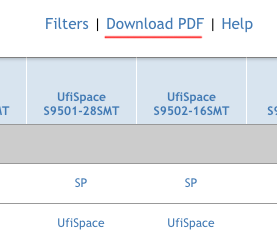
- See the upper right corner of the UI for the 'Download PDF' link
PDF Print Link screenshot
Q: Is the staging site a copy of production?
Answer:
- The staging site at https://ipimatrixstg.wpenginepowered.com/public/ is a copy of production
- Staging is not automatically mirrored to production. That is done manually by the Mighty Digital team
- This task is done in a separate dashboard at the web hosting provider WPEngine.com
Staging and Production are manually mirrored from time to time as needed, and it is coordinated between both teams.
Q: How does row ordering work?
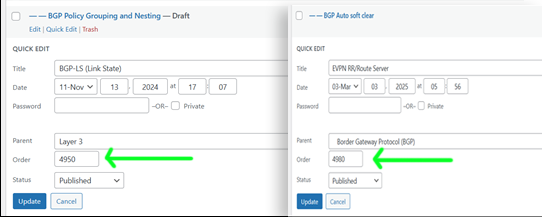
Use Case: The feature EVPN RR/Route Server had Order as 4980 and the BGP-LS (Link State) feature heading had order as 4950. But when viewing the content, the two items are in listed the other way around. What is going on?
Screenshot of the two items and their Order numbers.
Screenshot of how they are displayed.
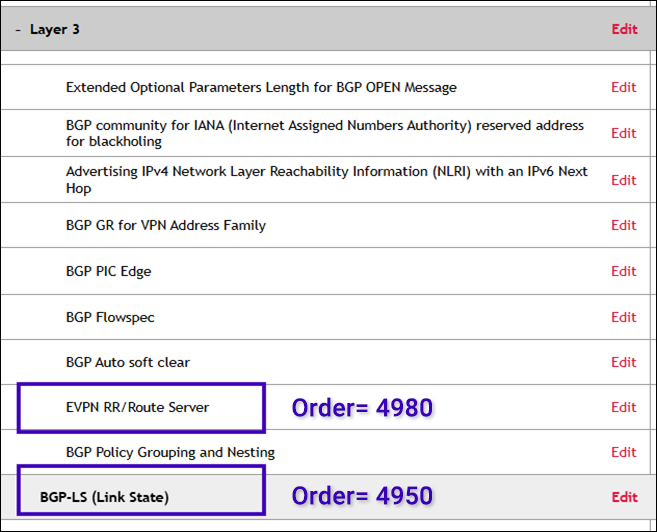
When viewing the admin screen with the order numbers, you will get a better view of all items by looking at the ordering column. https://featurematrix.ipinfusion.com/wp-admin/edit.php?post_type=feature
Answer:
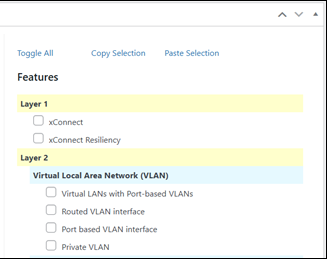
- Order of line items only applies within a specific level (parent or child group), as seen in the admin back end (colors shown in screenshot below)
- Yellow = level-1, cyan = level-2, no-color = level-3
- I.e., the ordering does not apply across different levels, only within them
Screenshot of colors indicating levels
Q: How does Copy and Paste work?
Answer:
- In order to copy and paste an item, that item must be selected by clicking the checkbox first
- Next use the copy link to make a copy of the data
- Then use the paste link immediately after clicking copy, to add the copy of the data to the UI
Screenshot of copy and paste function
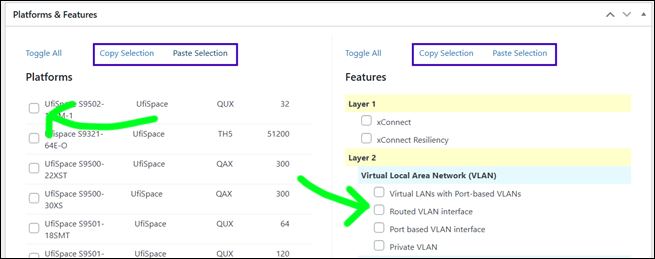
Copy and paste that is used on a PC with keyboard commands is not natively present in a web application--it must be programmed. This first version is a couple of manual clicks that may not be as intuitive, but it will save time vs. the back and forth of creating new database items from scratch.
Q: Why can I see records in the UI that are in draft mode? Don't they need to be published?
Answer:
- When you are logged into the Admin, all data is visible to you by default, this is the nature of Admin access
- This means that records still in Draft mode will show up in the UI while logged in
- To public viewers, this data will not be visible until it is Published
Use another browser that is not logged into the Admin backend--this is how a user will view the site. Use this method to confirm your draft items are not visible.
HOW TO MIGRATE CHANGES FROM STAGING TO PRODUCTION
The PRD and STG instances are not automatically connected. They are separate sites managed in the hosting back end. There is no feature in the WordPress admin backend to automatically publish content from staging over to production, or vice versa. Publishing data in the WordPress app happens only within a site instance, but not between.
There are two ways to move content between PRD and STG instances, both of which are manual steps:
- REPEAT WORDPRESS EDITS - For small edits, the same editing steps done in staging are repeated in production. This can be tedious, but for small number of edits it is faster.
- SERVER PUSH - When the quantity or complexity of edits is larger, the entire staging instance is pushed to production from the site hosting backend.
In the same fashion as when PRD is copied to STG to make a 1:1 mirrored copy, the reverse is also done. Once updates are completed and approved in STG, then that instance is copied back to PRD. The entire site and DB are mirrored in one operation. This has been done in the past without issue.
When a full site push is needed, IP Infusion staff will coordinate with the vendor team at Mighty Digital to copy STG over to PRD.
All site instances are backed up nightly (PRD and STG separately). In the case a server push needs to roll back to a previous instance that is also done from the site hosting back end.
FULL FEATURES LIST
TBD